Shader Type Overview
There are many types of shaders, all of which can be substituted by user-written
shaders:
- material shaders describe
the visible material of an object. They are the only mandatory part of any
material description. Material shaders are called whenever a visible ray
(eye ray, reflected ray, refracted ray, or transparency ray) hits an object.
Material shaders have a central function in mental ray.
- volume shaders are called
to account for atmospheric effects encountered by a ray. The state (see below)
distinguishes two types of volume shaders: the standard volume shader
that is called in most cases, and the refraction volume shader that
is taken from the object material at the current intersection point, and
becomes the standard volume shader if a refraction or transparency
ray is cast. Many material shaders substitute a new standard volume shader
based on inside/outside calculations. Volume shaders, unlike other shaders,
accept an input color (such as the one calculated by the material shader
at the last intersection point) that they are expected to modify.
- light shaders implement the
characteristics of a light source. For example, a spot light shader would
use the illumination direction to attenuate the amount of light emitted.
A light shader is called whenever a material shader uses a built-in function
to evaluate a light. Light shaders normally cast shadow rays if shadows are
enabled to detect obscuring objects between the light source and the illuminated
point.
- shadow shaders are called
instead of material shaders when a shadow ray intersects with an object.
Shadow rays are cast by light sources to determine visibility of an illuminated
object. Shadow shaders are basically light-weight material shaders that calculate
the transmitted color of an object without casting secondary or shadow rays.
Frequently, material shaders are written such that they can also be used
as shadow shaders.
- environment shaders are called
instead of a material shader when a visible ray leaves the scene entirely
without intersecting an object. Typical environment shaders evaluate a texture
mapped on a virtual infinite sphere enclosing the scene (virtual because
it is not part of the scene geometry).
- photon shaders are used to
propagate photons through the model in order to simulate caustics and global
illumination. Photon shaders are used in a preprocessing step in which
photons are emitted from the light sources into the model (just as a real
light source emits photons into the world). Each photon is traced through
the scene using a technique called photon
tracing which is similar to ray
tracing. As with ray
tracing a photon is reflected of a specular mirror surface in the mirror
direction. The most important difference is the fact that the photon shader
modifies the photon energy before reflecting the photon unlike ray
tracing which traces a ray and then modifies the result accordingly (for
example multiplies it with the specular reflection coefficients). Photon
shaders also store information about the incoming photon in a global photon
map which contains all photons stored in the model. This photon map is
then used by the material shaders during the rendering step (ray
tracing step) to simulate caustics and global illumination. Frequently,
material shaders are written such that they can also be used as photon shaders
(and also shadow shaders).
- photon volume shaders are
similar to photon shaders in the same way that volume shaders are similar
to material shaders: they compute indirect light interactions in volumes,
such as volume
scattering.
- photon
emitter shaders are used to control the emission of photons from a
light source. Combined with the light shaders it is possible to simulate
complex light sources with complex emission characteristics. Photon emitters
are only used if caustics or global
illumination are enabled, to construct a photon
map before the actual rendering takes place.
- texture shaders come in three
flavors: color, scalar, and vector. Each calculates and returns the respective
type. Typical texture shaders return a color from a texture image after some
appropriate coordinate transformation, or compute a color at a location in
3D space using some sort of noise function. Their main purpose is to relieve
other shaders, such as material or environment shaders, from performing color
and other computations. For example, if a marble surface were needed, it
should be written as a texture shader and not a material shader because a
texture shader does not have to calculate illumination by light sources,
reflections, and so on. It is much easier to write a texture shader than
a material shader. mental ray never calls a texture shader directly, it is
always called from one of the other types of shaders.
- displacement shaders are called
during tessellation of polygonal or free-form surface geometry, a procedure
that creates triangles to be rendered. Displacement shaders are called to
shift the created vertices along their normals by a scalar distance returned
by the shader. mental ray supports approximation controls
that allow adjusting the tessellation to better resolve curvature introduced
by displacement shaders.
- geometry shaders are run before
rendering begins. They create geometry procedurally by using a function call
library that closely follows the .mi2 scene description language. Unlike
displacement shaders, which are called once per vertex, geometry shaders
are responsible for creating an entire object or object hierarchy (each of
which, when tessellated later, can cause displacement shader calls).
- contour shaders come in four
different flavors: contour store shaders, contour contrast shaders, contour
shaders, and contour output shaders. For details see section contour.
- lens shaders are called when
a primary ray is cast by the camera. They may modify the eye ray's origin
and direction to implement cameras other than the standard pinhole
camera, and may modify the result of the primary ray to implement effects
such as lens flares.
- output shaders are different
from all other shaders and receive different parameters. They are called
when the entire scene has been completely rendered and the output image resides
in memory. Output shaders operate on the output image to implement special
filtering or compositing operations. Output shaders are not associated with
any particular ray because they are called after the last ray is completed.
- lightmap shaders can be attached
to materials to scan the surface of an object, collecting data and optionally
writing a writable
texture to disk. This can be used to "bake" illumination solutions into
a texture, for example.
- state shaders can be attached
to the options block. They are called on four occasions: Once a state is
created, once a state is destroyed, just before the first regular shader
for a sample is called, and just before the computed sample is written to
the frame buffer. These four cases may be distinguished by different constants
passed to the shader. These shaders may be used to manipulate the state of
mental ray. A common application is to add some data to the state that is
needed by various shaders during rendering.
The following diagram illustrates the
path of a ray cast by the camera. It first intersects with a sphere at point
A. The sphere's material shader first casts a reflection ray that hits a box,
then a refraction ray that intersects the sphere at its other side T, and finally
it casts a transparency ray that also intersects the sphere, at D. (This example
is contrived, it is very unusual for a material shader to cast both a refraction
and a transparency ray.) The same material shader is called at points A, T,
and D. In this example, the reflection trace depth may have prevented further
reflection rays to be cast at T and D.
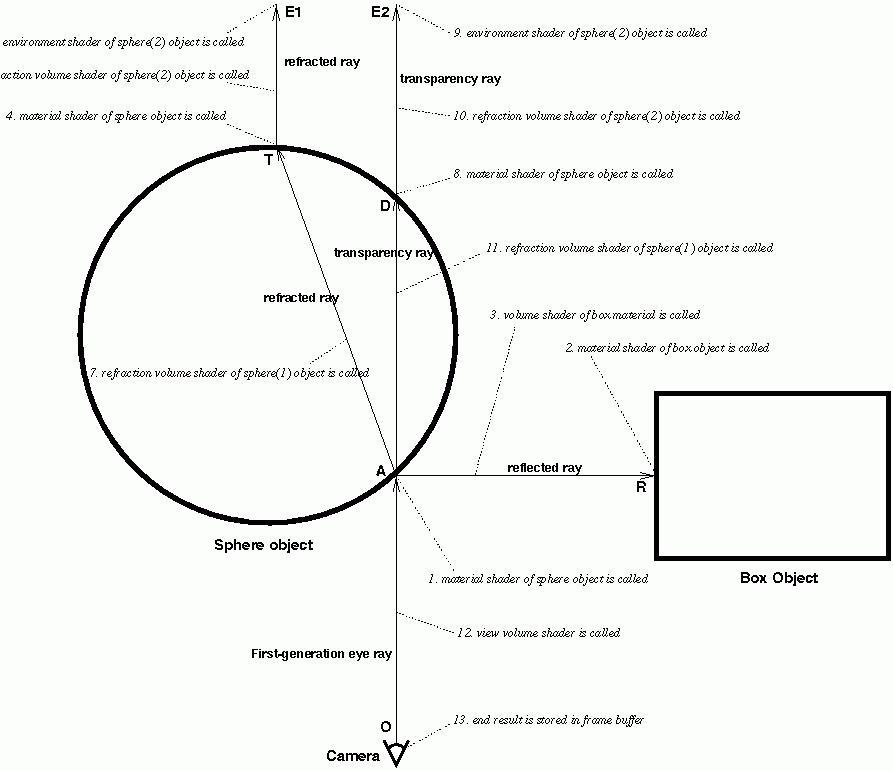
The annotations set in italics are numbered; the events described happen
in the sequence given by the numbers.
Since material shaders may do inside/outside calculations based on the surface
normal or the parent state chain (see below), the volume shaders are marked
(1) and (2), depending on whether the volume shader left by A or by T/D in
the refraction volume field of the state. The default refraction volume
shader is the one found in the material definition, or the standard volume
shader if the material defines no volume shader. For details on choosing volume
shaders, see the section on writing material and volume shaders. Note that
the volume shaders in this diagram are called immediately after the material
shader returns.
mental ray 3.0 also supports a autovolume mode,
enabled in the options block with autovolume on. In this mode, mental
ray finds out which volumes the camera is in by casting a single ray to infinity,
and offers four shader API functions that tell the shader which volumes the
current intersection point is in. Shader declarations may contain autovolume
levels that define which volumes mix and which volumes displace others.
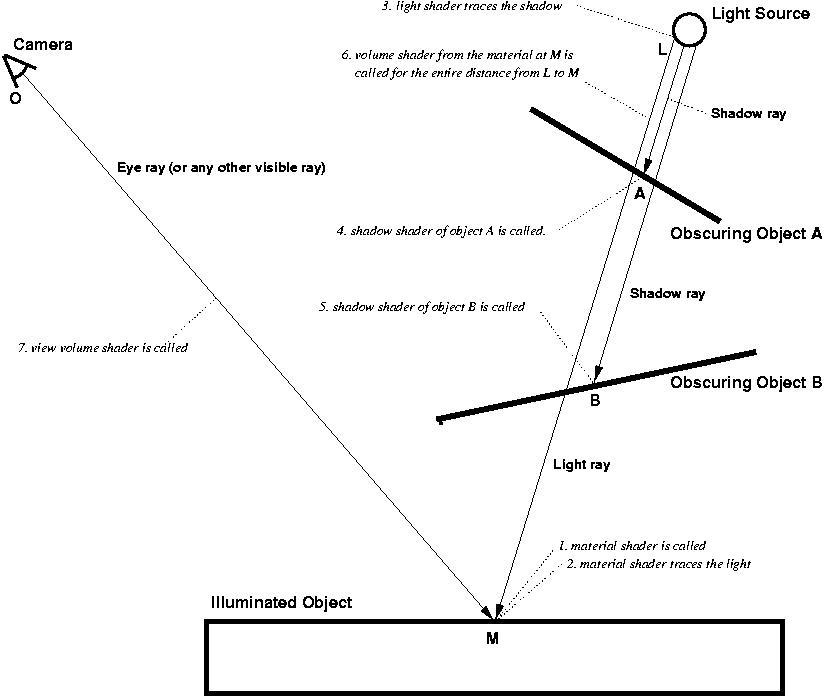
The
next two diagrams depict the situation when the material shader at the intersection
point M requests a light
ray from the light source at L, by calling a function such as mi_sample_light.
This results in the light shader of L to be called. No intersection testing
is done at this point. Intersection testing takes place when shadows are enabled
and the light shader casts shadow rays by calling mi_trace_shadow.
This function is called only once but may result in more than one shadow shader
call. There are four different modes for shadow casting, listed in the order
of increased computational cost:
- shadow off
No shadows are computed, and no shadow shaders are called. Call to mi_trace_shadow return
immediately without modifying the result color.
- shadow on
For each obscuring object (A and B), a shadow
ray is generated with the origin L and the intersection point A or B,
and the shadow
shaders of objects A and B are called to modify the light emitted by
the light source based on the transparency attributes of the obscuring object.
No shadow ray is generated for the segment from B to M because no other obscuring
object whose shadow shader could be called exists. Although shadow rays always
go from the light source towards the illuminated point in this mode, the
order in which the shadow shaders are called is undefined. If an object without
shadow shader is found, or if a shadow shader returns miFALSE, it
is assumed that no light reaches the illuminated point and the search for
more obscuring objects is stopped (although the light shader has the option
of ignoring this result and supplying some light anyway). See the first diagram
below. The volume shader of the illuminated object M is applied to the entire
distance between M and L.
- shadow sort
Same as the previous method, but shadow shaders are called in distance order,
object closest to the light source first. In the first diagram, steps 4 and
5 may be reversed.
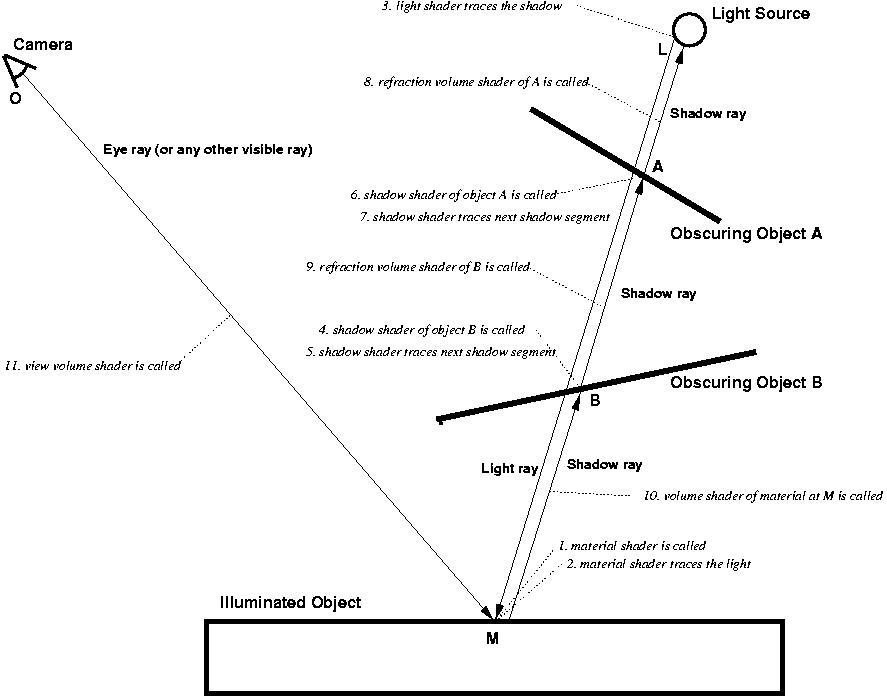
- shadow segments
This mode is more sophisticated than the others. Shadow rays become similar
to visible rays; they travel in segments from the illuminated point to the
first obscuring object, then from there to the next obscuring object, and
so on until the light source is reached. This means that shadow rays travel
in the opposite direction, and one shadow ray's end point becomes the next
shadow ray's origin. Volume shaders are called for each of these segments,
and every shadow shader must perform inside/outside calculations to store
the correct volume shader in  much
like material shaders to. This mode is preferred if volume effects should
cast shadows.
much
like material shaders to. This mode is preferred if volume effects should
cast shadows.
Note that the shadow segment mode requires complex shadow shaders to behave
differently. Every shadow shader must be able to work with all these modes,
so shadow shaders that deal with volumes or depend on the ray direction must
test  to
determine the mode. In case an incorrectly implemented shadow shader fails
to call mi_trace_shadow_seg to evaluate other shadows, mental ray will
call mi_trace_shadow_seg and then call the shadow shader again, thus
simulating the effect.
to
determine the mode. In case an incorrectly implemented shadow shader fails
to call mi_trace_shadow_seg to evaluate other shadows, mental ray will
call mi_trace_shadow_seg and then call the shadow shader again, thus
simulating the effect.
The first diagram shows the ray casting order and the ray directions for the shadow
on and shadow sort modes:
The next diagram shows the same situation in shadow segments mode:
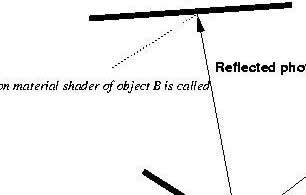
The following diagram illustrates the path of a photon shot from the light
source in the caustics or global
illumination preprocessing phase. First a photon is traced from the light
source. It hits object A, and the photon material shader of object A is called.
The photon material shader stores energy at the intersection point and determines
how much energy is reflected and how much is refracted, and the directions
of reflection and transmission. It then traces a new photon from A, in the
reflection direction, or in the transmission direction, or both. The reflected
photon hits object B, and the photon material shader of object B is called.
The photon material shader of object B stores energy at the intersection point
and shoots a new photon.
The remainder of this chapter describes how to write all types of shaders.
First, the concepts of ray
tracing state parameter passing common to all shaders are presented, followed
by a detailed discussion of each type of shader.