

|
There are 2 types of constraints: nails and pins. Nails allow to fix vertices of the cloth. Pins allow to attach vertices of the cloth to another object. Select the cloth. With the right button of the mouse, go to Vertex. Select some vertices of the cloth: for instance 2 corners of the cloth, located on the same side. Select in the Syflex menu: Syflex > Constraints > Nail You can now run the animation. You should get the following result: 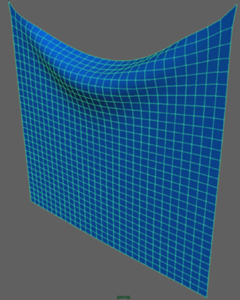 To change the nails, just select the nail constraint (in the outliner for instance), then select: Syflex > Constraints > Get Nail Add or remove vertices. Then select: Syflex > Constraints > Set Nail At this stage, you can play with different stiffness parameters. If you increase a spring stiffness, increase also the associated spring dampings. « Back Next » |
Syflex LLC - www.syflex.biz