

|
To create a force field on the cloth, select the cloth, and chose a force in the menu: Syflex > Forces. Assign a Gravity field to the cloth: first select the cloth, then select: Syflex > Forces > Create Gravity 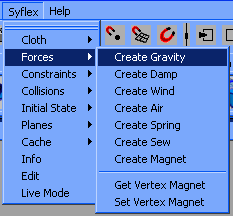 In the Channel Box, change the Gravity Y field to -0.17 The gravity intensity depends on the units used in your scene. For additional details on what the value should be in your case, read in the reference guide the gravity force (accessible through the help Maya menu). In the same way, assign a damping force: Select the cloth (click on the plane in the 3D window), and select: Syflex > Forces > Create Damp Throughout the simulator, there are many damping coefficients, and understanding the role of each is important. This damping force is a global viscous force that slows down the movements because of the air resistance. It is essential to add this force to avoid infinite oscillations. But you should keep it small. For instance on a shirt, if this coefficient is too high, the cloth will appear to be dragging behind the character. Another similar force is the air damping force. It is a bit more accurate because it takes into account the orientation of the face: This force will be highest on a face perpendicular to its motion direction. The 3 spring dampings in the cloth attribute page dissipate energy due to internal frictions. Increase them to avoid vibrations on the cloth. « Back Next » |
Syflex LLC - www.syflex.biz